
Why can't ChatGPT see your website? Five checks you can run
By Mohamed Hadri
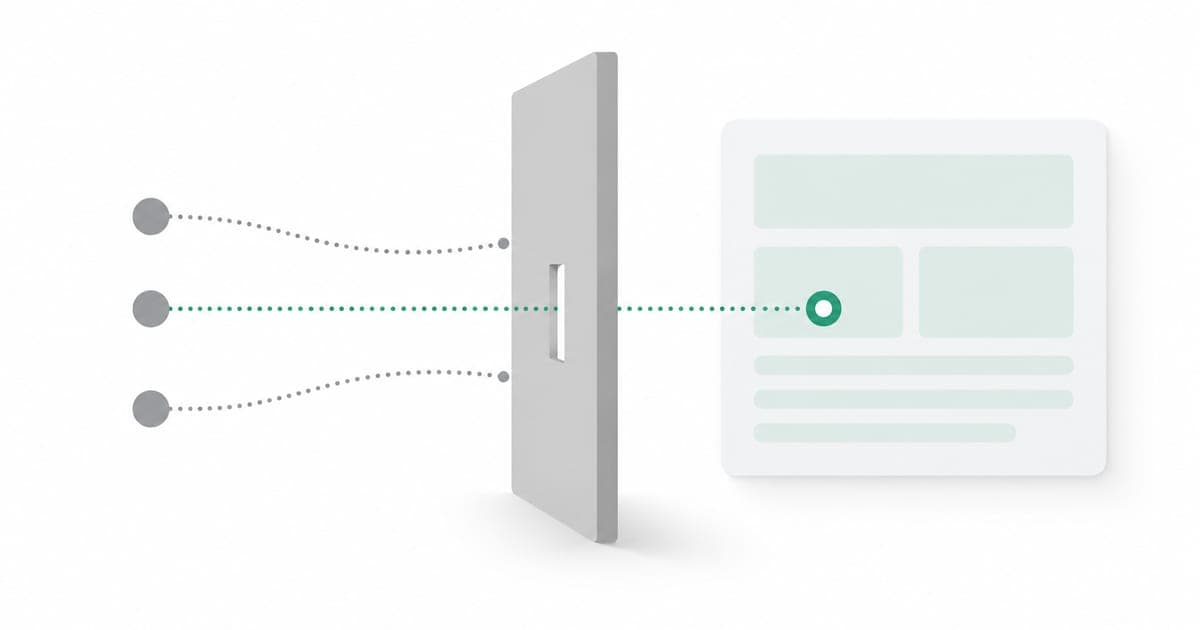
If ChatGPT can’t see your website, the cause may be that OpenAI’s search bot can’t get in, or gets in and finds little text to read. OpenAI names two conditions for a site to be eligible for ChatGPT search: your robots.txt has to allow that bot, and your host or CDN has to let its traffic through. A site can open fine in a browser, and even rank on Google, while a firewall turns AI bots away, or the bots get a page with almost no text because the text only appears after JavaScript runs.
Most of the five checks below apply to Perplexity, Claude and Google’s AI answers too; check 4 is about Google. Failing one can keep you out of their answers. Passing all five still won’t make an AI tool cite you.
The five checks at a glance:
| Check | Where to look | Bad sign |
|---|---|---|
| 1. robots.txt | /robots.txt on every version of your domain | Disallow: / for all bots or an AI search bot |
| 2. Firewall or CDN | Server or CDN logs, the bots’ IP lists | 403s or challenge pages for AI bots |
| 3. Raw HTML | View Source (Ctrl+U) | Main text, prices or phone number missing |
| 4. noindex | View Source, Search Console | noindex in a meta tag or header |
| 5. Platform | Your store platform or host | Bot rules you didn’t set |
Why can’t ChatGPT see my website when Google can?
Because they use different bots, and your site can treat them differently. Google runs your JavaScript before indexing a page (check 3), and a firewall can let Googlebot in while it turns other bots away (check 2). The symptom tells you which bot to look at:
- If ChatGPT search never cites you, look at OAI-SearchBot. OpenAI says sites that opt out of it aren’t shown in ChatGPT search answers.
- If ChatGPT can’t open a link you paste, the request most likely came from ChatGPT-User, which acts for a person, so OpenAI says robots.txt may not apply to it. Our reading: check your firewall (check 2), though the refusal alone proves nothing.
- If AI Overviews and AI Mode never show you, start with check 4. Google uses only indexed pages there.
- If Gemini reports an opt-out, see the end of check 1.
The bots of OpenAI, Anthropic, Perplexity and Google are listed in our post on which AI bots to block.
Check 1: Is your robots.txt shutting AI search bots out?
Open yourdomain.com/robots.txt in your browser and look for these two lines:
User-agent: *
Disallow: /
Together they shut the site to every bot the file doesn’t name in a group of its own. The same Disallow: / under User-agent: OAI-SearchBot keeps you out of ChatGPT search answers, though OpenAI says such sites can still appear as navigational links. Perplexity and Anthropic say blocking their search bots can cost you visibility in their search too.
Check every version people reach: with and without www, and each country or language domain, such as your .sa and .ae sites. Google says a robots.txt file covers only its own host, and Anthropic says a block has to go on each subdomain. Read the file at that address, because it can differ from the copy in your CMS. Cloudflare’s Bot Preference Sync, for example, adds its lines above yours.
Blocking GPTBot alone doesn’t hide you from ChatGPT search. It’s OpenAI’s training bot, set separately, so you can block it and still allow OAI-SearchBot. Our robots.txt AI rules generator lets you allow or block each AI bot and writes the lines to add to your file.
Gemini may show this error for your site:
URL_FETCH_STATUS_GOOGLE_EXTENDED_OPT_OUTIf it does, look for a Google-Extended group in each host’s file. That name controls whether Gemini Apps can ground answers in your pages. One site owner reported the error on Google’s help forum with a robots.txt that allows every crawler, and we found no explanation from Google. With no such group in your file, the cause is unknown.
Our free scan reads the robots.txt of the address you enter and, even without an account, says beside your score if the file shuts out every crawler it doesn’t name.
Check 2: Can a firewall block AI bots that robots.txt allows?
Yes, and before they ever read robots.txt. A firewall rule, a bot protection mode, a security plugin or a geo-blocking rule can refuse a bot or send it a challenge page. OpenAI and Perplexity ask sites to let their published IP addresses through, and Anthropic says its bots won’t try to get past CAPTCHAs. If your site only admits visitors from Gulf countries, check that rule too: in data Vercel published in December 2024, every AI crawler it measured ran from US data centres.
Three tests, most reliable first:
- Filter your server or CDN logs by bot name. A
200means the request succeeded, a403means it was refused, and a challenge page means the bot got nothing. On Cloudflare, open the Analytics page and select the Events tab, which lists requests its security features acted on. On paid plans you can break them down by user agent; the Free plan shows sampled logs only. - Compare addresses. OpenAI, Perplexity and Anthropic publish their bots’ IP addresses (OpenAI’s search bot list is
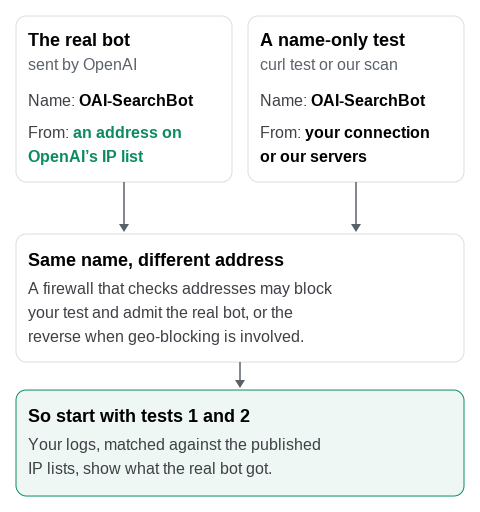
openai.com/searchbot.json). A request from those addresses is the real bot; one that only carries the name could be anyone. Perplexity’s firewall guide matches on both. - Send a request under a bot’s name and the same request under a browser’s, then compare the two status codes. Replace
www.example.comwith your address; on Windows PowerShell, typecurl.exeinstead ofcurl:
It’s quick, but it carries only the name, from your own connection. A firewall that checks addresses may block you and admit the real bot, or the reverse when geo-blocking is involved.curl -s -o /dev/null -w "%{http_code}\n" -A "Mozilla/5.0 (Macintosh; Intel Mac OS X 10_15_7) AppleWebKit/537.36 (KHTML, like Gecko) Chrome/131.0.0.0 Safari/537.36; compatible; OAI-SearchBot/1.4; +https://openai.com/searchbot" https://www.example.com/ curl -s -o /dev/null -w "%{http_code}\n" -A "Mozilla/5.0 (Windows NT 10.0; Win64; x64) AppleWebKit/537.36 (KHTML, like Gecko) Chrome/131.0.0.0 Safari/537.36" https://www.example.com/
On Cloudflare, the Block setting for AI crawlers has also stopped Googlebot, Bingbot and Applebot since 15 September 2026; our bots post explains the options.
Our free scan runs test 3 for you under the names Googlebot, OAI-SearchBot, PerplexityBot and Claude-SearchBot, and flags any that gets a refusal, an empty reply or a challenge page while a browser request gets the page. Like your curl test, it sends only the names, so the real bots may fare differently.
Check 3: Can AI bots read your page without JavaScript?
Only if your text is in the HTML your server sends. Don’t count on AI bots running JavaScript: OpenAI’s crawler page doesn’t say whether its bots do. A third-party study by Vercel and MERJ in December 2024 found that none of the major AI crawlers it measured rendered it, OpenAI’s, Anthropic’s and Perplexity’s included, though the bots may have changed since. Google renders pages in a headless Chromium before indexing them, and warns that not all bots can run JavaScript.
To see roughly what such a bot gets, press Ctrl+U in Chrome (⌘+Option+U on a Mac) for the page’s HTML, its initial content before scripts change it. Search it with Ctrl+F (⌘+F on a Mac) for your main service, a price and your phone number. Missing there usually means missing for a bot that skips JavaScript. If you use a terminal, curl your own product page (curl.exe in Windows PowerShell) and search the output.
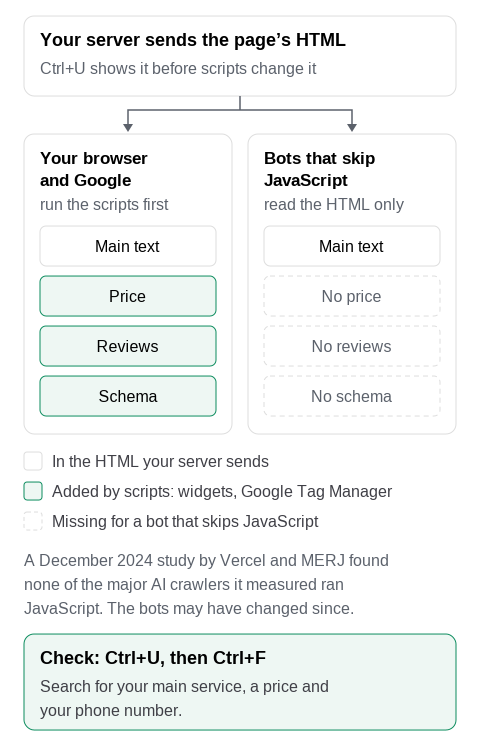
Look hardest at what scripts fill in: prices and reviews in widgets, and structured data (schema) added by Google Tag Manager. Google’s Rich Results Test checks the rendered page and Google reads schema that a script adds, so a “valid” result there doesn’t prove a bot that skips JavaScript sees it. Search View Source for application/ld+json.
The fix is to have your server send the important text, through server-side rendering or pre-rendering. Our free scan measures the readable text in your home page’s raw HTML, flags text that seems to need JavaScript and, on a store’s home page, product sections left empty until JavaScript runs.
Check 4: Is a noindex keeping you out of Google’s AI answers?
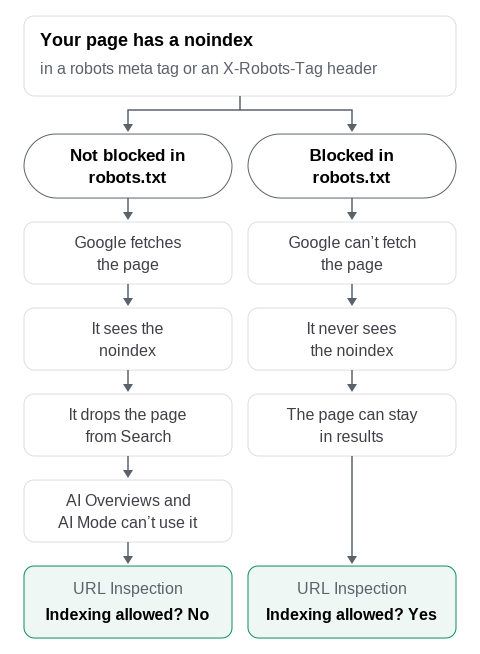
It will if Google finds one. A noindex in a robots meta tag or an X-Robots-Tag header makes Google drop the page from Search, and AI Overviews and AI Mode use only pages that are indexed and can show with a snippet.
In View Source, search for noindex. The tag looks like this:
<meta name="robots" content="noindex">A header won’t show there, so also inspect the page in Search Console’s URL Inspection tool: “Indexing allowed?” reads “No” when your site sends a noindex tag or header.
One trap: if you blocked a page in robots.txt to get it removed, Google can’t fetch it, never sees its noindex, and the page can stay in results. URL Inspection then shows “Indexing allowed?” as “Yes”.
Also check Settings > Search generative AI in Search Console, which can exclude your site from those features. Inclusion is the default.
Our free scan fails a home page with noindex in either place and says so beside your score. Without an account, if robots.txt also shuts the site, the warning names only the robots.txt; the full report names both.
Check 5: Your store is on Salla, Zid or Shopify. What can you change?
Each has a way to edit robots.txt, some with limits:
- Salla’s help centre shows a robots.txt editor on the SEO page under Marketing, plus a built-in LLMs.txt setting.
- Zid’s help centre shows a robots.txt editor under Online store > SEO, on the Growth and Professional plans only.
- Shopify says it handles bot management at the network level. You can edit robots.txt through a
robots.txt.liquidtheme template, but its support doesn’t help with that edit. - On other hosts and site builders, look for bot protection in the dashboard and ask support whether AI search bots get through.
A freelance listing we read, selling a file for AI bots, turned Salla and Zid stores away, saying the platforms don’t let you upload files. Both help centres show a robots.txt editor, and Salla has a built-in LLMs.txt setting.
I fixed it. How long until it counts?
Give a robots.txt change about a day. OpenAI says it can take about 24 hours to reach its systems, and Perplexity says up to 24 hours. OpenAI’s support team adds that this doesn’t guarantee inclusion. To see whether citations and visits follow, use the free reports in is AI search sending you visitors?
Some advice online also blames schema, llms.txt or backlinks. The crawler pages we read from OpenAI, Anthropic and Perplexity don’t name any of them as a condition for access, and Google says its search ignores llms.txt.
What our free scan checks
The free Mar2i AI scan runs a version of checks 1 to 4 on your home page. Without an account you get a 0-100 score, a status for each check (such as Passed, Partial or Missing) with the check names blurred and, if the scan finds one, a warning beside the score: a robots.txt that shuts out every crawler it doesn’t name, or a noindex home page. If both apply, it names the robots.txt. Which crawler names were refused, and whether your text needs JavaScript, are in the full report, free once you add the site to your account.
What it can’t do: these checks read only the home page, so test inner pages with View Source yourself. Its requests come from our servers, so the logs and IP lists in check 2 stay your job. It runs no JavaScript. Its score also weighs things other than access, so start with the warning beside the score, if there is one. And it can’t tell you whether any AI tool will cite you.
Sources
- OpenAI: Overview of OpenAI Crawlers
- OpenAI Help Center: Searching the web with ChatGPT
- OpenAI Developer Community: My Website Is Not Appearing in ChatGPT Search Results (reply from OpenAI Support) · 18 October 2026
- Perplexity: Perplexity Crawlers
- Anthropic: Does Anthropic crawl data from the web, and how can site owners block the crawler? · 7 April 2026
- Google: How Google interprets the robots.txt specification · updated 23 October 2026
- Google: Google’s common crawlers · updated 15 October 2026
- Google Search Central Community: Gemini returns URL_
FETCH_ STATUS_ GOOGLE_ EXTENDED_ OPT_ OUT despite robots.txt allowing all crawl · 20 October 2026 - Cloudflare: Say it once: introducing Bot Preference Sync · 21 August 2026
- Cloudflare: Have it both ways: stay discoverable in search while disallowing AI training · 15 September 2026
- Cloudflare docs: Security Events · updated 2 October 2026
- RFC 9110: HTTP Semantics · June 2022
- Vercel: The rise of the AI crawler · 17 December 2024
- Google: Understand JavaScript SEO basics · updated 4 March 2026
- Google: Generate structured data with JavaScript · updated 10 December 2025
- Google Chrome Help: Chrome keyboard shortcuts
- Chrome DevTools: Get started with viewing and changing the DOM · updated 1 March 2019
- Google: Block Search indexing with noindex · updated 10 December 2025
- Google: Google’s Guide to Optimizing for Generative AI Features on Google Search · updated 10 July 2026
- Search Console Help: Search generative AI control
- Search Console Help: URL Inspection tool
- سلة، مركز المساعدة: أدوات السيو في متجرك: دليل شامل · updated 18 October 2026
- زد، مركز المساعدة: تخصيص ملف Robots.txt (لوحة التحكم الجديدة) · updated 25 August 2026
- Shopify Help Center: Editing robots.txt.liquid