
AI Overviews traffic drop? How to check if AI is the cause
By Mohamed Hadri
Maybe, but check before you blame AI. To test for an AI Overviews traffic drop, look at the shape of the drop in Google Search Console. If impressions held while clicks fell, Google’s AI answers, and the ads around them, are a likely cause. If impressions fell too, look first for a ranking, indexing or technical problem.
The checks, in order:
- Make sure the drop is real. Compare Search Console with your analytics, and read Google’s data anomalies page.
- Compare clicks, impressions, CTR and position with the same months last year, with Ramadan and Eid lined up.
- If impressions fell too, rule out a block you made yourself first. It’s the one cause you can find and undo the same day. Our free scan looks for two of them and, without an account, warns you about either: a robots.txt with
User-agent: *andDisallow: /, which closes the site to crawlers, or anoindextag on your home page. - If impressions held, split question searches from brand and buying searches. Search a few yourself and note which show an AI Overview.
- Open Search Console’s generative AI report to see which of your pages Google shows in AI answers, then decide what to change.
Is it an AI Overviews traffic drop, or something else?
Your Performance report will tell you. Google’s guide to debugging traffic drops says: in the Date filter, open the Compare tab and pick “Compare last 3 months year over year”. Then click every tab under the chart to see which queries, pages, countries or devices changed, and sort the Pages table by Clicks Difference.
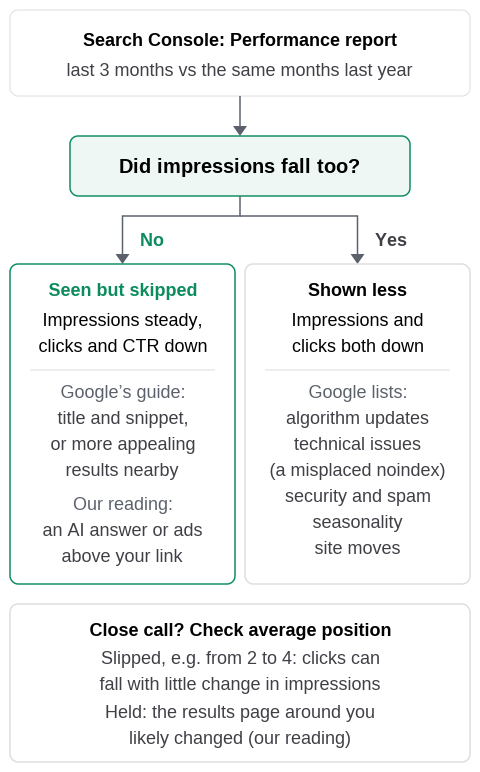
- Impressions steady, clicks and CTR down: you’re seen but skipped. Google’s guide blames your title and snippet, or more appealing results nearby. It doesn’t mention AI Overviews, but we think an AI answer or ads above your link would leave the same mark.
- Both down: you’re shown less. Google lists algorithm updates, technical issues such as a misplaced
noindex, security and spam issues, seasonality, and site moves. - Average position settles close calls. A slip from position 2 to 4 can cut clicks without a big change in impressions, Google says. If your position held, our reading is that the results page around you changed.
One trap: Google’s data anomalies page says a logging error stopped Search Console reporting impressions, CTR and average position accurately from 13 May 2025 to 27 April 2026, though clicks weren’t affected. A year-over-year change in those across these dates may be partly the report, so we’d lean on clicks.
If traffic fell off a cliff overnight, we doubt AI Overviews alone did it: they’ve been in the region since May 2025. Start with the sudden-drop list in our post on sites missing from Google. Our free scan shows both step 3 warnings beside your score and also compares what a request named Googlebot gets from your home page with what a browser gets. The real Googlebot may fare differently, so confirm in URL Inspection. That result, and which check is which, open free once you add the site to your account. The scan can’t see Search Console, other pages or nosnippet, and it keeps results for 24 hours.
When did AI Overviews reach your market?
On 20 May 2025, when Google brought AI Overviews to the Middle East and North Africa, and to Arabic worldwide, a year after the US. AI Mode came in Arabic on 8 October 2025.
Search Console can’t show that date any more: its date filter goes back 16 months, to early July 2025 today. For a before-and-after around May 2025, use your own analytics; outside tools only estimate your traffic.
Line up the Islamic calendar too. Ramadan began on 1 March in 2025 and on 18 February in 2026 (Umm al-Qura calendar), so a shop or recipe site can see a “drop” that is only Ramadan and Eid falling in different weeks. Google’s guide warns about yearly festivities too.
Can you see AI Overview clicks in Search Console?
Not on their own. The generative AI performance report, open to all sites since 31 August 2026, counts impressions in AI Overviews and AI Mode by page, country, device and date. It shows no clicks. Those sit with the rest of your Google clicks in the Performance report, under the “Web” search type.
Nobody outside Google knows if clicks will come. In a LinkedIn reply reported on 2 November 2026, Google’s Gary Illyes said there was nothing to announce yet. Until then, compare the pages the report lists with the pages that lost clicks. Our guide to AI traffic reports shows where it is.
What else takes Google clicks besides AI?
Mostly ads and Google’s ranking updates, both easy to mistake for AI.
Ads first. In October 2025 Google began grouping up to four text ads under a “Sponsored results” label that stays on screen as people scroll. In Similarweb estimates for a sample of about 10,000 US sites, paid search visits rose 21% from August 2024 to August 2026 while organic fell 13.2%. The analysis says it doesn’t establish whether AI or ads caused the loss.
Then updates. Google’s Search Status Dashboard lists 2026 core updates from 27 March and 21 May, and spam updates from 24 March, 24 June, 18 August and 24 September (read 3 November 2026). If you dropped after one, there might not be anything fundamentally wrong with your content, Google says.
For seasons, check your top queries one at a time in Google Trends, as Google suggests.
Which searches and sites lose the most?
Question searches lose the most, and publishers lose more than other sites. In Pew Research Center’s tracking of 900 US adults in March 2025, 60% of searches starting with question words such as “why” produced an AI summary. With one on the page, people clicked a regular result on 8% of visits, against 15% without; they clicked a link inside the summary on 1%.
Semrush, which sells SEO tools, reports that 88.1% of searches triggering AI Overviews are informational and few are commercial or transactional, so brand and buying searches look safer to us. In the Similarweb data, US publishers lost 41.5% of organic traffic over two years, while the typical small site was roughly flat.
Nobody agrees on how big the effect is, so trust your own Search Console over any study. Ahrefs linked an AI Overview to a 58% lower click-through rate for the top result (300,000 keywords, December 2025). Semrush found zero-click searches fell slightly, from 38.1% to 36.2%, once the same keywords showed AI Overviews.
Should you opt out of AI Overviews or block Google’s AI?
You can, but the one public test found it cost regular clicks too. Since 31 August 2026, Search Console has had a Search generative AI control under Settings > Search generative AI. It covers AI Overviews, AI Mode and generative AI in Discover, and sites are included by default. Exclude yours and, Google says, you get no traffic or impressions from those features, while similar content from other sites can still appear.
That test was one site. An SEO excluded it and, as Search Engine Roundtable reported on 30 October 2026, its AI impressions fell to zero and its regular clicks dropped too. AI Overviews kept appearing on those searches, just without that site.
The other switches:
nosnippetandmax-snippetlimit what AI Overviews and AI Mode can use, but they apply to all search results, so your normal listing shrinks too.Google-Extendedis about Gemini training and grounding. It doesn’t affect inclusion in Google Search; more in which AI bots to block.- Don’t block Googlebot. Google says AI is built into Search, so Googlebot’s robots.txt rules cover all of it.
What should you do now?
Judge each page by what it earns: leads, calls, orders or ad income. Google says clicks from results with AI Overviews are “higher quality”; your sales data will show whether that holds for you.
- To stay eligible as the cited link, a page must be indexed and eligible for a snippet. Google lists no additional requirements: no special files or markup.
- Is SEO dead? Google says SEO best practices remain relevant for AI Overviews and AI Mode, so keep doing the basics.
- If you’re thinking of closing an ad-funded blog, first compare what your best articles earned before and after May 2025.
Sources
- Google Search Central: Debugging drops in Google Search traffic · updated 10 December 2025
- Search Console Help: Data anomalies in Search Console · read 3 November 2026
- Google MENA Blog: Bringing AI Overviews to MENA, and in Arabic globally · 20 May 2025
- مدونة Google: توفير "وضع AI" في البحث باللغة العربية · 8 October 2025
- Wikipedia: Ramadan
- Search Console Help: Generative AI performance report (Search)
- Google Search Central Blog: Introducing Search Generative AI performance reports in Search Console · 3 June 2026
- Google Search Central: AI features and your website · updated 10 December 2025
- Search Engine Roundtable: Gary Illyes Implies Click Data Not Coming To Google Search Console AI Reporting · 2 November 2026
- Google: New sponsored results label in Google Search · 13 October 2025
- Search Engine Land: Organic traffic is down, but it’s not all AI · 28 October 2026
- Google Search Status Dashboard · read 3 November 2026
- Pew Research Center: Google users are less likely to click on links when an AI summary appears in the results · 22 July 2025
- Semrush: What to Do About AI Overviews Traffic Loss · 5 January 2026
- Ahrefs: Update: AI Overviews Reduce Clicks by 58% · 4 February 2026
- Search Console Help: Search generative AI control
- Search Engine Roundtable: Google AI Overviews & AI Mode 0.9% Click-Through Rate, Opt Out Study Says · 30 October 2026
- Google Search Central: Robots meta tag, data-nosnippet, and X-Robots-Tag specifications · updated 24 March 2026
- Google: Create and submit a robots.txt file · updated 21 November 2025
- Google: Google’s common crawlers · updated 30 October 2026