
AI giving wrong information about your business? What to do
By Mohamed Hadri
When ChatGPT, Google’s AI Overviews or another AI tool gives wrong information about your business, there’s no form to edit the answer. What works is finding where the wrong fact comes from, fixing it there, then reporting the answer. Google says its AI Overviews “can and will make mistakes”, and OpenAI says ChatGPT’s search results “can be incomplete, outdated, or incorrect”.
The checks, in order:
- Ask AI tools about your business the way customers do, and save each answer.
- Open the sources they cite and find the wrong fact.
- Fix your website: one page with your facts in plain text.
- Fix your Google Business Profile and your other listings.
- Report the answer, then ask again each month.
How do you check what AI says about your business?
Ask what customers ask, naming your business: are you open now, your hours, address, phone, prices, what you offer. Add your city, as OpenAI suggests when local results show the wrong area. On Google’s Search help forum, an owner found AI answers giving another company’s services and prices as theirs; a reply noted that several companies share the name.
- Ask ChatGPT, Gemini and Copilot, and search your name on Google for the AI Overview and AI Mode.
- Ask in Arabic and in English. In one test of 20 London hotel queries, only 28% of the websites the AI tools cited, leaving out what the study calls platform sources, appeared in both languages’ answers.
- Ask ChatGPT while signed out: OpenAI says saved memories can shape the search it runs.
- Ask each question two or three times, and keep dated screenshots.
Why does AI keep giving wrong information about your business?
Because it repeats what it finds or already holds, and some of that is outdated or about someone else. Open each source the answer cites, as OpenAI advises, and check when it was updated. If the source is right, look here:
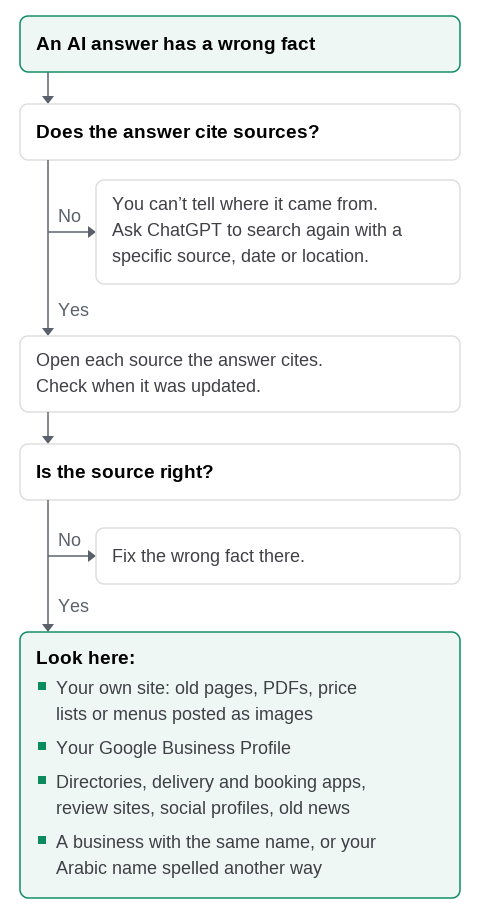
- Your own site: old pages, PDFs, price lists or menus posted as images.
- Your Google Business Profile, which Google builds from several sources: crawled websites such as yours, licensed third-party data and facts users contribute.
- Directories, delivery and booking apps, review sites, social profiles, old news.
- A business with the same name, or your Arabic name spelled another way in Latin letters.
No sources shown? Then you can’t tell where the answer came from. We found no way to edit what a model already holds, but OpenAI suggests asking ChatGPT to search again with a specific source, date or location.
What should your website say so AI gets it right?
Your website is the one source you fully control, and Google may publish a stranger’s edit to your listing if you don’t answer in time and your website seems to back it (next section). First, make sure bots can read it.
To make a site eligible for ChatGPT search, OpenAI says to allow OAI-SearchBot and let its published IP addresses through your host or CDN. Google’s Business Profile help asks you to make sure Googlebot isn’t blocked. You can block GPTBot, OpenAI’s training bot, and still allow OAI-SearchBot; see which AI bots to block.
Our free scan sends requests named Googlebot, OAI-SearchBot, PerplexityBot and Claude-SearchBot to your home page, reads your robots.txt and measures the text that loads without JavaScript. Without an account, it shows a status for each check and warns in plain words if robots.txt shuts out every crawler it doesn’t name. It can’t see your Maps listing or what AI says about you; why ChatGPT can’t see your website covers each check and how to check it yourself.
Then, on your contact or about page, write these as plain text, since Google asks for important content “in textual form”:
- Your name, spelled one way everywhere. For an Arabic name, pick one Latin spelling (our advice, not a published rule).
- Your address, the areas you serve, and your phone.
- Your hours, including Ramadan and holidays.
- What you offer and what you don’t, with prices or starting prices.
- A “last updated” date.
Your Arabic and English pages should match; remove old pages that contradict them.
LocalBusiness markup can tell Google your hours in code, but Google says its AI features need no special schema and that structured data should match the visible text. Our free schema generator writes LocalBusiness markup from a short form.
Someone changed your Google listing, or it says closed. What now?
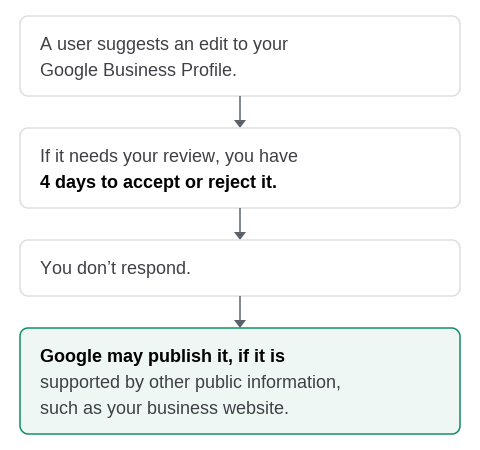
Answer Google’s notifications, because a stranger’s edit can go live if you don’t. Users can suggest edits to your Business Profile; when one needs your review, “you have 4 days to accept or reject the suggestion.” If you don’t respond, Google may publish it “if it is supported by other publicly available information, such as your business website.”
In Edit profile, check hours, phone, address, categories and description.
- Marked temporarily or permanently closed? Under Hours, choose “Open with main hours” (if you moved or renamed, add a new profile instead).
- Eid and holidays: use special hours, which Google describes for holidays and closures of up to 6 days in a row; for 7 days or more, mark the business temporarily closed. For Ramadan, we suggest changing your regular hours for the month.
- Someone else owns the listing: request ownership with “Request access”. If the owner doesn’t respond within 3 days, you may be able to claim it, though Google says that option isn’t always available.
For Bing Maps, Microsoft points to Bing Places for Business. For ChatGPT, OpenAI says it may share a user’s location with “trusted third-party providers” of local information, such as nearby business listings, and doesn’t name them. You can’t target one, so keep the same facts on all of them.
What about directories, delivery apps and online stores?
Ask each one to correct the wrong fact, and keep your name, address and phone identical everywhere; Google asks for your name exactly as it appears on your signage.
- Restaurants: OpenAI says ChatGPT may show reservation times from OpenTable, Resy or Yelp. Check your listing there.
- Wikipedia: its conflict-of-interest guideline strongly discourages editing an article about your own business and suggests proposing changes on the talk page.
- Online stores: for a wrong price or stock, check the product page and any feed you send, such as Google Merchant Center, which Google’s AI features guide says to keep up to date.
How do you report a wrong AI Overview or ChatGPT answer?
Use the feedback button under the answer, but none of the help pages we read promises to change a specific answer. Report after fixing the source.
- AI Overviews: thumbs down, then “Report a problem”, pick a category and add details.
- ChatGPT: thumbs down under the message, then “Select an issue”. For content you believe breaks the law, OpenAI has a reporting form, and says reported domains may be reviewed by its Model Quality team.
- Gemini: signed in, click “Bad response” (you can add a reason); for legal issues, choose More, then “Report legal issue”.
- AI Mode, Copilot, Perplexity: we couldn’t open a help page with the steps; look for a feedback option by the answer.
If you think an answer is defamatory, ask a lawyer.
How long until the answer changes?
No vendor page we read gives a timeline for an AI answer. Google says Business Profile edits usually take up to 10 minutes to review, sometimes up to 30 days; OpenAI says a robots.txt change can take about 24 hours to reach its search systems. After that, as far as we can tell, it depends on when each tool rereads the page. Ask the same questions monthly and keep the log; anyone promising a fix by a date is guessing. To see whether AI tools send you visitors, read is AI search sending you visitors?
What our free scan checks
The free Mar2i AI scan runs 24 checks on your home page and root files, among them the access checks described in the website section, noindex and structured data. Its requests come from our servers, so a firewall may treat the real bots differently.
Without an account you get a score out of 100, each check’s status with its name blurred, and a warning if robots.txt shuts out every crawler it doesn’t name or your home page says noindex. Details and general fixes open free once you add the site to your account. A repeat scan within about 24 hours may show the earlier result. It doesn’t check AI answers, your listings, whether your other pages are right (it may read a FAQ page for its markup only), or whether your Arabic and English pages agree.
Sources
- Google Search Help: Find information in faster & easier ways with AI Overviews in Google Search
- Google Search Central: AI Features and Your Website · updated 10 December 2025
- Google Search Central: Local Business (LocalBusiness) Structured Data · updated 8 September 2026
- Google Business Profile Help: Understand Google updates on your Business Profile
- Google Business Profile Help: Understand what happens to your Business Profile edits
- Google Business Profile Help: Understand how Google sources & uses info in Business Profiles & local search results
- Google Business Profile Help: Edit your Business Profile
- Google Business Profile Help: How to set Special hours
- Google Business Profile Help: Mark your business as reopened
- Google Business Profile Help: Request ownership of a Business Profile
- Google Search Community: The generated AI information is incorrect and damaging to my business. · 16 February 2026
- OpenAI Help Center: Searching the web with ChatGPT
- OpenAI Help Center: Reporting content in ChatGPT and OpenAI platforms
- OpenAI: Overview of OpenAI Crawlers
- Gemini Apps Help: Send feedback or report a problem with Gemini Apps
- Microsoft Support: Add and manage your business listing
- Wikipedia: Conflict of interest
- PRmoment: Same brands, different evidence: Why Arabic AI visibility needs its own PR strategy · 26 August 2026