
How to get your products in ChatGPT shopping outside the US
By Mohamed Hadri
To get your products in ChatGPT shopping, you have two routes: a product feed your store shares with OpenAI, or the open web, where ChatGPT’s search crawler reads your store. Nobody can pay for a place. If your store is in the Gulf, Egypt or North Africa, the web is the route that works today, because OpenAI says shopping in ChatGPT is live in the U.S. only.
The checks, in order:
- Make sure your robots.txt doesn’t block
OAI-SearchBot, ChatGPT’s search crawler. BlockingGPTBotonly keeps you out of training. - Make sure your firewall or CDN doesn’t answer crawlers with a “verify you are human” page. Our free scan tests your home page for this, and for robots.txt blocks.
- Open a product page’s source and look for the name, price, stock and description in the HTML.
- Keep product data complete on your platform. Apply for OpenAI’s feed, but don’t wait for it.
- Count the orders that come from AI tools.
How do you get your products in ChatGPT shopping: a feed, the web, or paying?
With a feed or through the web. Paying isn’t an option. OpenAI’s merchants page asks stores to share a product feed (prices, availability, images, reviews) through its Agentic Commerce Protocol, so products show up in shopping results. The feed is optional: the page lets you share feeds through systems or supported providers you already use, and says a feed gives you more control over how your products appear.
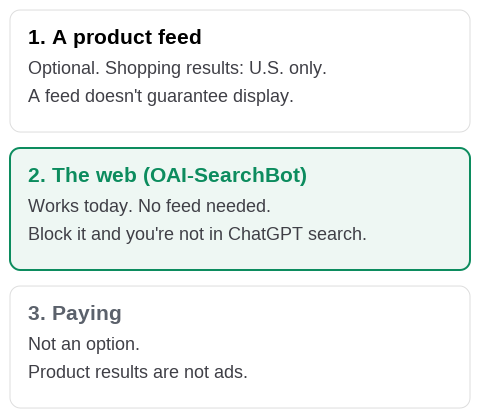
The web route is ChatGPT search. OpenAI says OAI-SearchBot surfaces websites in ChatGPT’s search features, and sites that block it won’t be shown in ChatGPT search answers (they may still appear as plain navigational links). When ChatGPT picks products, its help page says it weighs structured product data such as price and description from first- and third-party providers, plus other third-party content.
The same help page says product results are picked independently and are not ads. The merchants page says there are no fees on purchases made on your site or app, and that shoppers now finish buying on your site or app, as OpenAI moves away from its standalone Instant Checkout. A feed guarantees nothing either: OpenAI’s feed specification says eligibility doesn’t guarantee display.
Is ChatGPT shopping open in Saudi Arabia, the UAE or Egypt?
Not according to OpenAI. On 4 November 2026 OpenAI’s merchants page said shopping is live in the U.S. and will reach more regions over time. Some guides that rank for this question say product results already show in other markets; OpenAI’s merchants page names only the U.S.
You can still apply as a merchant. The form’s headquarters list includes Saudi Arabia, the UAE, Egypt and Morocco. Applicants join a waitlist, and OpenAI says it is building a merchant platform for self-serve data integration (“later this year”, the page said on 4 November 2026). Apply if you like, but don’t plan around it: until OpenAI expands, its shopping results don’t reach your shoppers. ChatGPT search answers can link to any store OAI-SearchBot can read, and they need no feed.
Shopify, WooCommerce, Salla or Zid: is your catalog already connected?
OpenAI’s merchants page names only Shopify and Etsy as already connected: it says their catalogs are “already integrated”, with no application needed. Shopify says its Agentic Storefronts is turned on automatically for eligible stores, and terms apply. OpenAI’s page doesn’t name WooCommerce, Salla or Zid.
| Platform | In OpenAI’s feed today? | What to do this week |
|---|---|---|
| Shopify | Yes, per OpenAI. Shopping results reach U.S. shoppers only. | Check Agentic Storefronts in your admin, then fix the web side below. |
| WooCommerce, Salla, Zid | Not named | Apply through OpenAI’s form if you like; fix the web side. |
| Custom build | Not named | Apply if you can produce a feed to OpenAI’s specification; fix the web side. |
If someone offers to “connect your store to ChatGPT” for a fee, ask what exactly gets connected. Managing your store from inside ChatGPT doesn’t put your products in anyone else’s answers.
Can ChatGPT and the other AI tools read your product pages?
Only if nothing stops them, and three things often do: robots.txt, bot protection, and products that need JavaScript. You can fix all three.
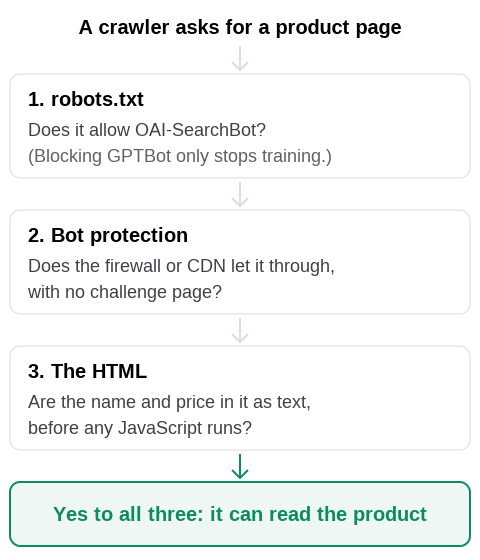
Start with robots.txt. OpenAI’s settings are independent, so you can let OAI-SearchBot in for search and keep GPTBot out of training:
User-agent: OAI-SearchBot
Allow: /

User-agent: GPTBot
Disallow: /
Perplexity says PerplexityBot surfaces and links sites in its search results and isn’t used to train models. Our post on which AI bots to block covers the other names.
Then check bot protection. For OAI-SearchBot, OpenAI recommends allowing requests from its published IP ranges. If your firewall or CDN hands a crawler a challenge page, the crawler never sees the product, whatever robots.txt allows. Our post on why ChatGPT can’t see your website shows where to look.
Last, JavaScript. A study by Vercel and MERJ in December 2024 found that ChatGPT’s and Claude’s crawlers fetched JavaScript files but didn’t run them; the bots may have changed since. A price or stock line that appears only after scripts run, or sits inside an image, may never reach them. Google, for its AI features, asks for important content to be available as text. To check, open a product page in Chrome, press Ctrl+U to see its HTML, then Ctrl+F for the product name and price. If they aren’t there, ask your platform or developer why.
Our free scan runs these tests on your home page. It requests the page under the names of four search crawlers, OAI-SearchBot among them, and flags a refusal, a challenge page, or a store whose product sections stay empty until JavaScript runs, plus robots.txt rules that block search crawlers. Our request carries the crawler’s name, not its IP address, so a firewall that trusts OpenAI’s IP ranges may refuse us and still let the real crawler in. Without an account you see the score and each check’s result, with the check names hidden; the details open free once you add the site to your account. The scan doesn’t read your product pages or your feed, and it can’t tell you whether ChatGPT names your store.
Why do Amazon and big brands win, and where can a small store?
Because ChatGPT leans on data the giants have plenty of. Its help page says it ranks merchants on availability, price, quality and whether the merchant is the maker or main seller, and summarises reviews from public websites. A marketplace with stock, sharp prices and thousands of reviews scores well on all of that.
A small store has a chance where those factors favour it: when you make the product or are its main seller, when your pages answer the specific question (sizes, materials, delivery to Jeddah or Alexandria), and in niches the giants don’t stock. B2B stores play by the same rules, but a price behind a login is a price no crawler can read.
What about Google AI Mode, Gemini and Perplexity?
On Google it’s ordinary SEO plus Merchant Center. Google says there are no additional requirements to appear in AI Overviews or AI Mode, and asks you to keep your Merchant Center and Business Profile up to date. Its guide to generative AI features says Merchant Center feeds can help products show in AI responses and other Google Search results. A Merchant Center help page lists Saudi Arabia and the UAE among the countries where you can list products free; Egypt isn’t on it. No Google page we read says where AI Mode shows product listings or how the Gemini app picks products.
For Perplexity, the part we could confirm is the crawler: allow PerplexityBot. Guides describe a Perplexity merchant programme, but its merchant link led us to a sign-in page for another product, so we don’t know what it offers.
Do schema, FAQ sections or llms.txt get your products in?
Nothing we read says they do. Google’s guide says Google Search ignores llms.txt, and that structured data isn’t required for its AI features but still helps with rich results. Google also asks that structured data match the visible text on the page. OpenAI’s shopping pages talk about feeds and product data, not markup. If you have budget for an “AI file”, put it into complete product pages first.
How will you know if it’s working?
Count orders and visits. Look in your analytics for visits whose source names an AI tool; our post on whether AI search sends you visitors shows where. Shopify says its Agentic Storefronts labels AI sales in its reports. Add “an AI assistant such as ChatGPT” to your “how did you hear about us?” options. Keep a list of 10 to 15 questions your buyers would ask, run them once a month, and note whether your store comes up. Expect small numbers at first.
Sources
- OpenAI: Power product discovery in ChatGPT · read 4 November 2026
- OpenAI Help Center: Shopping with ChatGPT Search · updated 31 October 2026
- OpenAI Developers: Products – Agentic Commerce
- OpenAI: Overview of OpenAI Crawlers
- Shopify: Agentic Storefronts
- Perplexity: Perplexity Crawlers
- Vercel: The rise of the AI crawler · 17 December 2024
- Google Chrome Help: Chrome keyboard shortcuts
- Google Search Central: AI features and your website · updated 10 December 2025
- Google Search Central: Google’s Guide to Optimizing for Generative AI Features on Google Search · updated 10 July 2026
- Google Merchant Center Help: Show your products for free on Google