
How to check if your site appears in ChatGPT and Gemini
By Mohamed Hadri
To check if your site appears in ChatGPT or Gemini, ask them yourself, the way a customer would, several times, with the settings that skew answers turned off. We found no official report that tells you whether ChatGPT or the Gemini app mentions your site.
The checks, in order:
- Write 10 questions your customers ask, most without your brand name.
- Ask each three times in ChatGPT with search on, the Gemini app and Google. In ChatGPT, log out or use an unpersonalized temporary chat.
- Log whether you were named or linked, who was named instead, and the sources cited.
- Open Search Console’s generative AI report and Bing’s AI Performance report.
- If you never appear, check first that AI search crawlers can reach your site.
Is there an official way to see if your site appears in ChatGPT or Gemini?
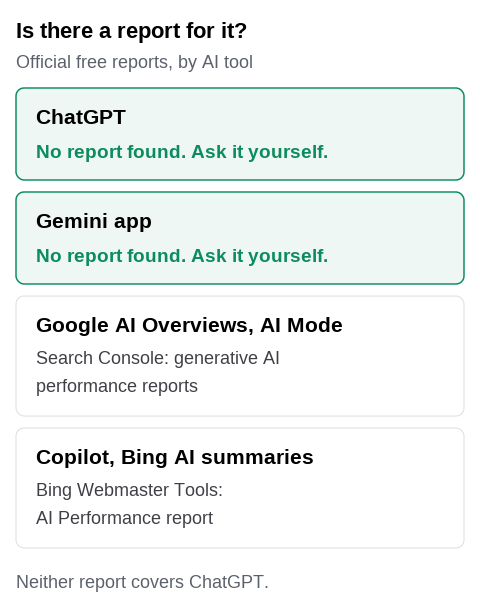
Not one we could find for ChatGPT or the Gemini app. We found no OpenAI report for site owners, only pages on how its crawlers work, and we found no Google report for the Gemini app. Google and Microsoft each have a free report for their own search:
- Google Search Console has generative AI performance reports, announced on 3 June 2026 and rolled out to all websites on 31 August 2026. They count how often your URLs appeared in AI features on Search, such as AI Overviews and AI Mode, and in Discover. The announcement doesn’t mention the Gemini app.
- Bing Webmaster Tools has an AI Performance report, launched in public preview on 10 February 2026. It counts citations of your pages in Microsoft Copilot, AI summaries in Bing and some partner integrations. ChatGPT isn’t on that list.
Our post on whether AI search is sending you visitors covers both reports and your analytics.
What counts as “showing up”?
There are three levels, weakest first: the answer names you, links to one of your pages as a source, or recommends you. Write down which one you got.
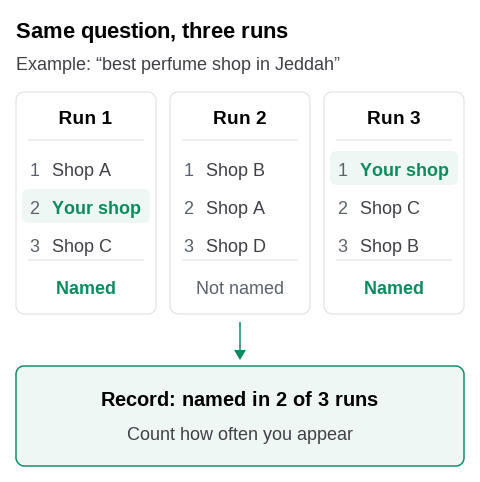
The question matters too. With your name (“what does [your brand] sell?”) it tests what the tool knows about you. Without it (“best perfume shop in Jeddah”, “a good dental clinic in Nasr City”) it tests whether the tool suggests you to a stranger, and that is what new customers ask. Make most of your list that kind.
What changes the answers you see?
- If memory is on, ChatGPT may use saved memories when it turns your question into a web search. A temporary chat can still use them unless you pick Unpersonalized before the first message. Or log out: OpenAI says people who are not signed in can also use web search.
- ChatGPT may search on its own. To be sure, choose Search from the tools menu, then open Sources to see the links. The Gemini app shows a Sources button when an answer has sources.
- ChatGPT may use an approximate location based on your IP address. A test from Dubai may name different shops than one from Cairo, so test from your customers’ country.
- Ask in the Arabic your customers type, dialect and all, and separately in English that you write yourself. We found no vendor page on how much language changes the answer, so treat each language as its own test.
On Google, AI Mode and AI Overviews may use different models, so their answers and links vary, and AI Overviews often don’t show at all. Check both.
How to check if your site appears in ChatGPT by hand
Our version, sized for one owner (a longer list is better):
- Write 10 questions: 6 about your category without your name, 2 comparing you with a named competitor, 2 about facts on your business (hours, branches, what you sell).
- Ask each three times in ChatGPT with search on, the Gemini app and Google (look for an AI Overview, then try AI Mode). Start a new chat for every run.
- Log one row per run in a spreadsheet.
Example rows (invented):
| Date | Tool | Language | Question | Named? | Your page linked | Named instead | Sources cited |
|---|---|---|---|---|---|---|---|
| 1 Nov | ChatGPT, search on | Arabic | أفضل محل عطور في جدة | No | None | Shop A, Shop B | A directory, a news roundup |
| 1 Nov | Gemini app | English | best perfume shop in Jeddah | Yes | Your About page | Shop A | A review site |
Then count. The number to track is something like “named in 4 of 9 runs”. Ask the same questions every month. For a client, the sheet shows exactly what was asked and what came back.
Why does the answer change every time, and can you trust one check?
One check tells you very little. In a SparkToro and Gumshoe study reported by Search Engine Land, 600 volunteers ran 12 identical prompts through ChatGPT, Claude and Google’s AI nearly 3,000 times. The odds of the same list of brands twice were under 1 in 100. The same list in the same order was closer to 1 in 1,000. Search Engine Land’s write-up says these tools are built to vary their answers.
How often a brand appeared across runs held up better, so the sheet counts how often you appear. How many runs make that number reliable is a question the study leaves open. Three per question is our own floor.
What about Gemini?
“Gemini” can mean the Gemini app or Google’s AI answers inside Search (AI Overviews and AI Mode). Search Console covers the Search side. The app you test by hand. For AI Overviews and AI Mode, Google lists no additional requirements beyond being indexed and eligible to show with a snippet. We found no such Google page for the Gemini app, so don’t assume a Google ranking carries over to the app.
What do free checkers and paid trackers actually measure?
- Readiness checkers look at your site and never ask an AI anything. GeoReady’s FAQ says its free check does not query ChatGPT directly. Our free scan is this kind too, so it can’t tell you whether AI tools mention you.
- Free visibility checkers report on AI answers, but you don’t choose the questions. Semrush’s free checker takes your domain and reports the topics and prompts where your brand appears, so it picks the questions. Our AI Visibility Checker asks one fixed question (“What are the best [industry] in Saudi Arabia and the Arab world?”) to an OpenAI model with web search, through OpenAI’s developer API, which is separate from the ChatGPT app. It gives one sample: ask again within a week with the same details and you get the same answer.
- Paid trackers repeat your question list on a schedule.
Before paying, ask: Does it query the consumer apps or the developer API? (Whether APIs behave like real users is another open question in that study.) From which country? Can I add my own Arabic questions? How many runs per question? Can I read each full answer and its sources?
Our view: if you track a few dozen questions a month in two languages, or report to clients, a tracker can save you time. Below that, the sheet is enough.
What if you never appear?
Check access first. OpenAI says sites that opt out of OAI-SearchBot will not be shown in ChatGPT search answers, though they can still appear as plain navigational links. GPTBot is its training crawler, and the two settings are independent. OpenAI’s own example allows the first and blocks the second:
User-agent: OAI-SearchBot
Allow: /

User-agent: GPTBot
Disallow: /
That site can still appear in ChatGPT search. After you change robots.txt, OpenAI says its systems can take about 24 hours to adjust.
Our free scan checks this on your home page. It reads your robots.txt, compares what your site sends to requests from our servers named OAI-SearchBot, PerplexityBot, Claude-SearchBot and Googlebot with what it sends a browser, and looks for noindex. Without an account you see a score, each check’s status, with its name and explanation blurred, and a warning if robots.txt shuts out every crawler it doesn’t name or your home page says noindex. For what the checks mean, read why ChatGPT can’t see your website and which AI bots to block.
If access is fine, read the “sources cited” column for answers that named a competitor. Those directories, review sites and roundups are your to-do list. If an answer gets your facts wrong, see what to do when AI gets your business wrong.
What our free tools check
The free Mar2i AI scan runs 24 checks on your home page and root files and makes no AI calls. Details and general fixes open free once you add the site to your account; a repeat scan within about 24 hours may show the earlier result. The AI Visibility Checker gives one sample of one question. Neither replaces the sheet.
Sources
- OpenAI: Overview of OpenAI Crawlers
- OpenAI Help Center: Searching the web with ChatGPT
- OpenAI Help Center: Temporary chat in ChatGPT
- Google Search Central: Introducing Search Generative AI performance reports in Search Console · 3 June 2026
- Google Search Central: AI features and your website
- Gemini Apps Help: View related sources from Gemini Apps
- Bing Webmaster Blog: Introducing AI Performance in Bing Webmaster Tools Public Preview · 10 February 2026
- Search Engine Land: AI recommendation lists repeat less than 1% of the time: Study · 28 January 2026
- GeoReady: ChatGPT visibility checker (FAQ)
- Semrush: Free AI Search Visibility Checker