
How to get your local business recommended by ChatGPT
By Mohamed Hadri
To get your local business recommended by ChatGPT, Gemini or Google’s AI answers, you have to show up in the places each tool reads: your website, your map listings, and reviews and mentions on other sites. Google says Gemini uses public information from Google Maps. ChatGPT searches the web and doesn’t say who supplies its local listings. Nobody can promise you a spot in the answer, but you can fix the parts you control.
The checks, in order:
- Can AI tools read your website at all? Check that first with our free scan, because a blocked or empty site takes away a source these tools cite.
- Complete and verify your Google Business Profile, then Bing and Apple where offered.
- Use one name, address and phone everywhere, in Arabic and English.
- Earn real reviews and mentions on sites people in your country trust.
- Test with buyer questions, in both languages, several times.
Where do ChatGPT, Gemini and the others get local recommendations?
Only some vendors say. Their own help pages tell you this:
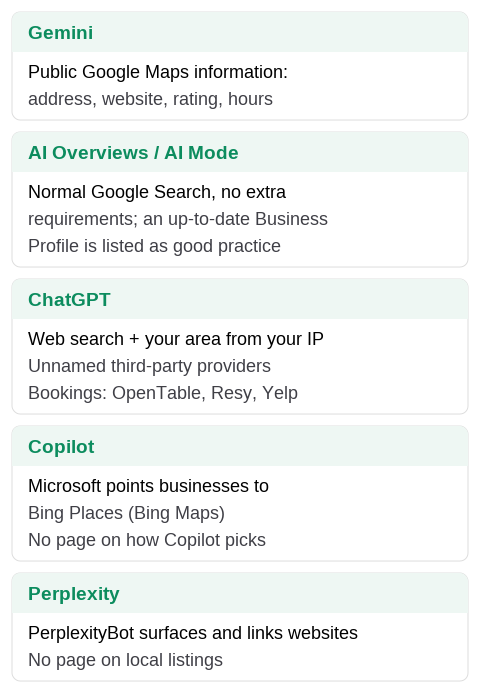
- Gemini finds places and gives addresses, websites, ratings and opening hours from public Google Maps information.
- Google’s AI Overviews and AI Mode have no additional requirements beyond normal search. Google does list an up-to-date Business Profile as a good practice.
- ChatGPT searches the web and may estimate your area from your IP address. It may share that location with “trusted third-party providers” of things like nearby business listings, and OpenAI doesn’t name them. For restaurant bookings it names OpenTable, Resy and Yelp (outside the US and Canada, only OpenTable).
- For Copilot, Microsoft sends businesses to Bing Places, which feeds Bing Maps. We found no Microsoft page on how Copilot picks local businesses.
- Perplexity’s crawler, PerplexityBot, surfaces and links websites in its results. We found nothing from Perplexity on local listings.
For outside data, there’s BrightLocal, a company that sells listing services. It ran 60,970 checks on 1,355 businesses in the US, UK and Australia. Google Business Profile made up 28.5% of all citations, and about 93% of cited domains were the businesses’ own websites. In ChatGPT, Yelp appeared in 80% of answers and Google’s profiles weren’t a top source. No Middle East country was in the sample, so read it as a hint.
“We’re first on Google Maps. Why doesn’t ChatGPT name us?”
Because your Maps rank is Google’s ranking, and ChatGPT reads other sources. Google ranks local results mainly on relevance, distance and prominence (Google also calls it popularity). Gemini draws on that Maps data. ChatGPT, in BrightLocal’s sample, leaned on directories and websites instead.
The answer also changes with who’s asking. ChatGPT may rewrite a question with the asker’s city and saved memories, so two people can get two different lists. A single test from your own phone tells you very little.
Step 1: can AI tools read your website?
Your site is the one source you fully control, so make sure the bots can get in. OpenAI says sites opted out of OAI-SearchBot “will not be shown in ChatGPT search answers”, though they can still appear as navigational links, and that it can take about 24 hours for OpenAI’s systems to pick up a robots.txt change. Perplexity asks you to allow PerplexityBot, and Google lists allowing crawling in robots.txt and your CDN. OpenAI treats its training bot and its search bot as separate settings, so you can let one in and keep the other out:
User-agent: OAI-SearchBot
Allow: /

User-agent: GPTBot
Disallow: /
More bot names: which AI bots to block. Or let our robots.txt generator write the file.
Next, put the basics on your home and contact pages as plain text. Google asks for important content “in textual form”: your name, the city and districts you serve, your services, phone and hours. LocalBusiness markup can describe the same details in code. Google says AI features need no special schema, and markup should match the visible text.
Our free scan checks this step on your home page: your robots.txt, requests named Googlebot, OAI-SearchBot, PerplexityBot and Claude-SearchBot, the text that loads without JavaScript, and Organization markup (a LocalBusiness type counts). Without an account you see a score and each check’s status, with the names blurred. Why ChatGPT can’t see your website shows how to run each check by hand.
Step 2: your map listings, in Arabic and English
Start with Google Business Profile, since Gemini reads Maps. Google says verified businesses with complete, accurate details are more likely to show in local results. It also fills your profile from crawled web content, licensed data and users, so an old phone number on some directory can creep back in.
- Use your real-world name, as it reads on your storefront and website. Google’s guidelines don’t allow the same name repeated in two scripts in the profile name, even if your sign shows both. Pick one Latin spelling for an Arabic name and stick to it (our advice).
- Keep one address and one phone format on your site, your profile and every directory (our advice).
- On Bing Places, Microsoft warns that some features may not be available in your country, and we found no country list. Try claiming your listing.
- On Apple Maps, Apple Business lets you edit your place card. Apple’s availability table lists Brand and Location Management for Egypt and the Gulf, with a note on Saudi Arabia, the UAE, Qatar and Bahrain that it isn’t offered in every country.
Step 3: reviews and mentions people in your country trust
Reviews and links feed prominence, which Google measures partly by how many websites link to you and how many reviews you have. Ask every customer. On a computer, open your Business Profile, click Read Reviews, then Get more reviews, and copy the link or save the QR code. Reply to the reviews you get. Don’t buy them: Google’s policy bans paid reviews, incentives, and asking only your happy customers.
For mentions, look close to home: your chamber of commerce, your sector’s associations, a professional directory for clinics or lawyers, local news, event listings. Most English guides name US sites such as Yelp. Pick the sites your own customers use (our advice).
City or whole country, many areas, or no shop?
Showing up for “best clinic in Jeddah” but not “best clinic in Saudi Arabia” is normal. Distance is one of Google’s three local factors, and ChatGPT adds the asker’s area. A country-wide question puts you up against every business in the country, so prominence counts for more (our reading).
If you serve many areas from one office, Google allows one service-area profile with up to 20 areas. Write a page per city only when you have something real to say about that city. Google calls city pages that funnel visitors to one page doorway abuse.
If you sell online with no address, map listings matter less. Your product pages, and whether AI tools can read them, matter more.
And the FAQ? Put it on your site, as text. Use the profile for hours, category and services.
How to test it, in Arabic and English
Ask what a buyer would ask, without your name: “best orthopaedic doctor in [district]”, then «أفضل دكتور عظام في [الحي]».
- Ask signed out, since saved memories can shape ChatGPT’s search.
- Name the city. OpenAI suggests this when results show the wrong area.
- Ask each question three times in ChatGPT, Gemini and Copilot, and keep dated screenshots.
- Open the sources each answer cites: that’s where you need to be listed.
If an answer gets your details wrong, see AI giving wrong information about your business. To see whether AI tools send you visitors, read is AI search sending you visitors?
Can anyone guarantee your local business gets recommended by ChatGPT?
No. OpenAI says “Placement is not guaranteed”, and Google says there’s no way to request or pay for a better local ranking. Ask a freelancer for work you can check: what was fixed on the site, which listings were claimed, and a fixed set of test questions run every month in both languages.
What our free scan checks (and what it doesn’t)
The free Mar2i AI scan runs 24 checks on your home page and root files, including the access and text checks in Step 1. Its requests come from our servers, so your firewall may treat the real bots differently. Details and general fixes open free once you add the site to your account.
It doesn’t check your Google Business Profile, Bing Places, Apple Maps, reviews, directories, mentions on other sites, pages other than your home page, or what AI tools say about you.
Sources
- Gemini Apps Help: Find places & get directions in Gemini Apps
- Google Search Central: AI Features and Your Website · updated 10 December 2025
- Google Search Central: Local Business (LocalBusiness) Structured Data · updated 8 September 2026
- Google Search Central: Spam policies for Google web search
- Google Business Profile Help: Tips to improve your local ranking on Google
- Google Business Profile Help: Understand how Google sources & uses info in Business Profiles & local search results
- Google Business Profile Help: Guidelines for representing your business on Google
- Google Business Profile Help: Manage your service areas for service-area & hybrid businesses
- Google Business Profile Help: Read & reply to reviews
- Google Business Profile Help: Create a Google link or QR code to request reviews
- Maps User Contributed Content Policy: Prohibited and restricted content
- OpenAI Help Center: Searching the web with ChatGPT
- OpenAI: Overview of OpenAI Crawlers
- Perplexity: Perplexity Crawlers
- Microsoft Support: Add and manage your business listing
- Apple Business User Guide: Apple Business feature availability · 14 April 2026
- Apple Business User Guide: About locations · 8 October 2026
- BrightLocal: Top sources and directories for local AI search: What 1.9million citations across 116,670 domains tells us · 26 August 2026