
Claim your business in ChatGPT? What the leak shows so far
By Mohamed Hadri

Not yet. As of 9 November 2026 there is no public way to claim your business in ChatGPT, and OpenAI hasn’t announced one: its ChatGPT release notes don’t mention it. All we have is a screenshot of an unreleased screen titled “Claim your business in ChatGPT”, which Juozas Kaziukėnas posted on LinkedIn and Search Engine Roundtable (SER) reported on 6 November 2026.
The checks, in order:
- Don’t pay anyone to “claim” or “list” you in ChatGPT. There’s nothing to claim yet.
- Check that
OAI-SearchBot, ChatGPT’s search crawler, can reach your site. Our free scan tests your home page for this. - Make your business facts match on your site and listings, in Arabic and English.
- Start a monthly record of how ChatGPT shows you.
- Watch ChatGPT and OpenAI’s own pages for the real launch.
Can you claim your business in ChatGPT today?
Not today. Juozas wrote that he saw the feature’s first steps “as early as August” and that it looks close to launch. That’s his guess; OpenAI has given no date or price. One widely shared repost calls it OpenAI’s own Google Search Console, which OpenAI hasn’t said either. Until it shows up in ChatGPT or on OpenAI’s site, be wary of anyone selling early access.
What does the leaked “Claim your business” screen show?
It shows three cards under an “unreleased/beta” label, and a line saying you’ll need to prove you represent the business. In the screenshot SER published, the first card reads “Track how often your business is mentioned in ChatGPT conversations.” The second asks for your latest products and current business details. The third offers a “business agent” that answers customers’ questions with context you control.
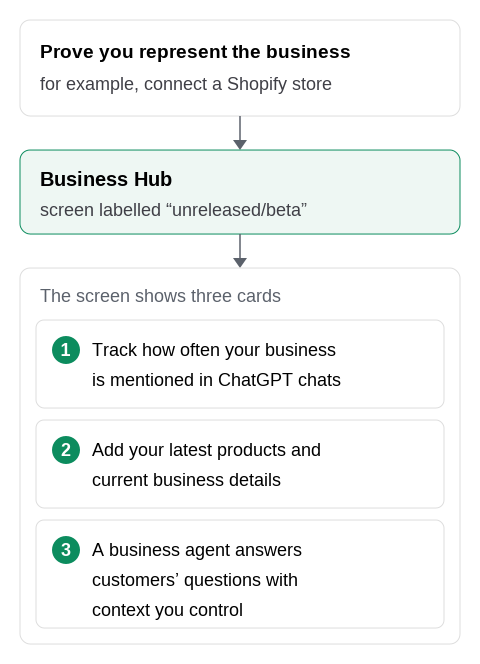
Juozas wrote that the screen is part of a larger “Business Hub”, open only to businesses that have verified ownership, for example by connecting a Shopify store. SER added that it seems separate from ChatGPT ads.
What would it tell you, and what wouldn’t it?
Juozas wrote that it charts two numbers a day, and leaves a lot out:
| It would show, per day | It would not show |
|---|---|
| Impressions: times you appeared in ChatGPT answers | The prompts behind them, or any data about the people who asked |
| Clicks from those answers to your website | How competitors did, any ranking, or why your numbers moved |
Nobody has said what counts as an impression, for example whether logged-out chats count. We also expect its clicks not to match your analytics, since some ChatGPT visits arrive with no source (see whether AI search sends you visitors). And being in an answer doesn’t mean ChatGPT recommended you.
Juozas himself sees the data as useful “combined with external tools that track prompts”.
Is it the same as ChatGPT Business, ChatGPT shopping or ChatGPT ads?
No, though the names are easy to mix up. OpenAI’s Arabic help article «التسجيل في ChatGPT Business» (“Sign up for ChatGPT Business”) looks like the page you want, but it’s about buying a team plan.
| Name | What it is | Who it’s for |
|---|---|---|
| ChatGPT Business | A paid ChatGPT workspace for teams | Your staff |
| Shopify’s ChatGPT plugin, Salla AI Connector | Run your own store from inside ChatGPT (Shopify; Salla asks for a paid plan) | You, the owner |
| ChatGPT shopping | Product results; stores can share a feed. Live for U.S. users for now | Shoppers |
| ChatGPT ads | Paid, labelled placements that, OpenAI says, don’t influence answers | Advertisers |
| “Claim your business” (Business Hub) | Ownership check, impressions and clicks, products, a business agent | Verified owners; not released |
Two more look-alikes. Telling ChatGPT about your business lists you nowhere, because OpenAI says memory personalises your own responses. And a “your store inside ChatGPT” app works when a user picks it or mentions it with @, which differs from turning up in answers.
What if you’re on Salla, Zid or WooCommerce, or sell a service?
Nobody knows yet. Shopify is the only route reported, and only as an example; nothing has come out about Salla, Zid, WooCommerce, custom sites, service businesses or countries. Our advice: don’t switch platforms over an unreleased feature, and don’t assume it will or won’t reach the Gulf, Egypt or Morocco.
ChatGPT shopping is separate: OpenAI’s merchants page says it’s live for U.S. users, with Shopify and Etsy catalogs already integrated (see ChatGPT shopping outside the US). Salla describes its ChatGPT connector as a way to run your store from a chat, and doesn’t say it shows your products to shoppers (see our Salla and Zid post).
Should you pay someone to claim or list you in ChatGPT?
You shouldn’t. With no public claim flow, nobody can claim you, and nothing reported says claiming gets you mentioned more. OpenAI says of ChatGPT search that “Placement is not guaranteed”, and that ads don’t influence its answers. Walk away from anyone selling a guaranteed place or a “your store inside ChatGPT” app as visibility; our local business post lists what to ask a freelancer instead.
How can you see how ChatGPT shows your business today?
Keep a monthly record from four sources, each with a blind spot, so you can check the hub’s numbers if it ships.
- Ask ChatGPT ten buyer questions without your brand name, like “best dental clinic in Nasr City”, in Arabic and English, three times each, and note who gets named. How to check if your site appears in ChatGPT has the steps.
- In your analytics, count visits referred by chatgpt.com. Visits with no source won’t be in it (see is AI search sending you visitors?).
- Add “an AI assistant such as ChatGPT” to “how did you hear about us?” on your order or booking form.
- Read Bing’s and Google’s AI reports, though neither names ChatGPT. Bing Webmaster Tools’ AI Performance report counts citations in Copilot, Bing’s AI summaries and some partner tools, with a sample of the search phrases behind them (“grounding queries”). Search Console’s generative AI reports, open to all sites since 31 August 2026, count impressions in Google’s AI Overviews and AI Mode.
What can you fix now so ChatGPT gets your business right?
Let ChatGPT’s search crawler in
Start here: if the crawler can’t reach your site, ChatGPT search has less of you to show, and a claim screen less to count (our reasoning). OpenAI says sites that opt out of OAI-SearchBot won’t be shown in ChatGPT search answers, while blocking GPTBot, its training crawler, is a separate setting. Its own example lets the first in and keeps the second out. As robots.txt rules, that reads:
User-agent: OAI-SearchBot
Allow: /

User-agent: GPTBot
Disallow: /
OpenAI also asks sites to allow its published IP ranges, which we read as a sign that a firewall can block what robots.txt allows. More in why ChatGPT can’t see your website and which AI bots to block.
Our free scan checks this on your home page: it reads robots.txt and requests the page under four search crawlers’ names, OAI-SearchBot among them, and counts a refusal, an empty reply or a challenge page against the site. The requests come from our servers, not the crawlers’ IP addresses, so your firewall may treat the real crawler differently. Without an account you see the score and each check’s status, with check names blurred.
Use the same facts everywhere
Your name, phone, address or service area, hours, delivery and returns should read the same on your site, Google Business Profile, Bing Places, Apple Maps, Instagram and marketplaces such as Noon or Amazon, in Arabic and English (our advice). More in local business recommendations and AI getting your business wrong.
Put the answers on your own site
However the business agent ends up working, put the answers it would need on your pages now as plain text: delivery areas and times, returns, cash on delivery, booking, price ranges (our advice). Nobody has reported who would answer for what the agent says.
Stores: keep product pages readable
Product names, prices and stock should be in the page’s HTML before any JavaScript runs. See the Salla and Zid post.
What does our free scan check, and what doesn’t it?
The free Mar2i AI scan reads your home page and root files. Besides the crawler checks, it flags a noindex home page and looks for Organization or Person markup with sameAs links. Details and general fixes open free in your account (today, adding the site is enough). It doesn’t track ChatGPT mentions or impressions, see prompts, verify you with OpenAI, read listings or feeds, compare your details across sites, or predict whether ChatGPT will name you.
Sources
- Search Engine Roundtable: OpenAI Working On ChatGPT Tools For Business For Analytics & Citations · 6 November 2026
- Juozas Kaziukėnas on LinkedIn: ChatGPT is building an analytics tool… · 6 November 2026
- OpenAI Help Center: ChatGPT release notes · read 9 November 2026
- OpenAI: Overview of OpenAI Crawlers
- Google: How Google interprets the robots.txt specification · updated 23 October 2026
- OpenAI: Power product discovery in ChatGPT · read 9 November 2026
- OpenAI: ChatGPT Business
- OpenAI Help Center: التسجيل في ChatGPT Business
- Shopify Help Center: Building and managing your store with third-party AI tools
- مركز المساعدة - سلة: ربط متجرك مع ChatGPT
- OpenAI Help Center: Ads in ChatGPT · read 9 November 2026
- OpenAI Help Center: Searching the web with ChatGPT
- OpenAI Help Center: Memory in ChatGPT
- OpenAI Help Center: Connected apps in ChatGPT
- Bing Webmaster Blog: Introducing AI Performance in Bing Webmaster Tools Public Preview · 10 February 2026
- Google Search Central Blog: Introducing Search Generative AI performance reports in Search Console · 3 June 2026